> For the complete documentation index, see [llms.txt](https://docs.kleos.io/llms.txt). Markdown versions of documentation pages are available by appending `.md` to page URLs; this page is available as [Markdown](https://docs.kleos.io/for-companies-1/how-to-give-employees-access-to-the-company-profile.md).
# How to Give Employees Access to the Company Profile
On Kleos, you can add users to your Company account. Depending on their role, they can edit company information, manage payouts and contractors, and give access to other users.
## **Inviting a User to the Company**
{% stepper %}
{% step %}
### **Go to the profile**
To view the list of users who have access, open [**Profile**](https://app.kleos.io/profile) in the upper-right corner.
{% endstep %}
{% step %}
### Inviting a user
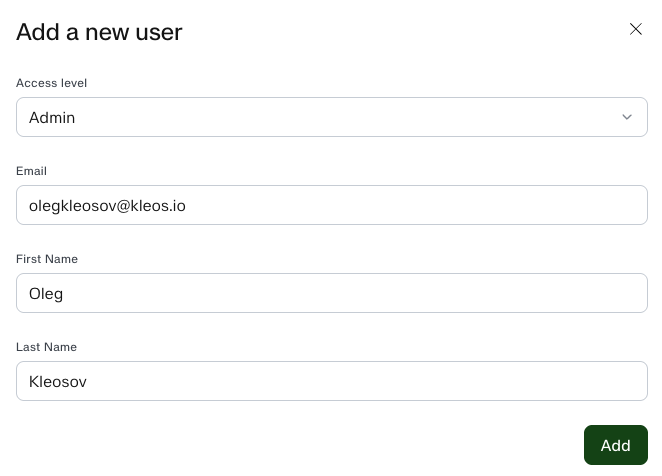
In the **Access level** section, click **“Add a user”** and complete the form.
#### Access levels
* Admin\
Edit company details, create invoices for top-ups, manage contractors and payouts, add admins, and configure access.
* Manager (Soon)\ Create invoices for top-ups and manage contractors, without the ability to process payouts or add admins.
* Viewer (Soon)\ View the list of contractors, payouts, and transaction history, without the rights to create or delete.
{% hint style="info" %}
The **Owner** role is assigned automatically and cannot be edited.
{% endhint %}
Once the form is completed, click **“Add”.**
The user will receive a notification about the granted access at the specified email address.
{% endstep %}
{% endstepper %}
## How to Change a User’s Access or Status
{% stepper %}
{% step %}
### **Go to the profile**
To view the list of users who have access, open [**Profile**](https://app.kleos.io/profile) in the upper-right corner.
{% endstep %}
{% step %}
### **Select a user to update**
Select the user you want to update, then click the **three-dot menu** next to their status.
{% endstep %}
{% step %}
### Make changes
Update the user’s details or role status, then click **“Change”.**
{% endstep %}
{% endstepper %}
{% hint style="info" %}
You cannot edit the **Owner** role or change your own role.
{% endhint %}
## **Switching between accounts**
If you are an administrator of multiple Companies, or if you also have a Contractor profile, you can switch between accounts.
Click the **three-dot menu** in the upper-right corner of the platform and select the account you want to use.